Feedbucket alternative: One tool for the site and everything around it
Feedbucket was built for agencies collecting feedback on a staging website. MarkUp was built for reviewing everything a team produces, websites included.
01 · Why MarkUp
Three places the two tools part ways
Review more than a live site
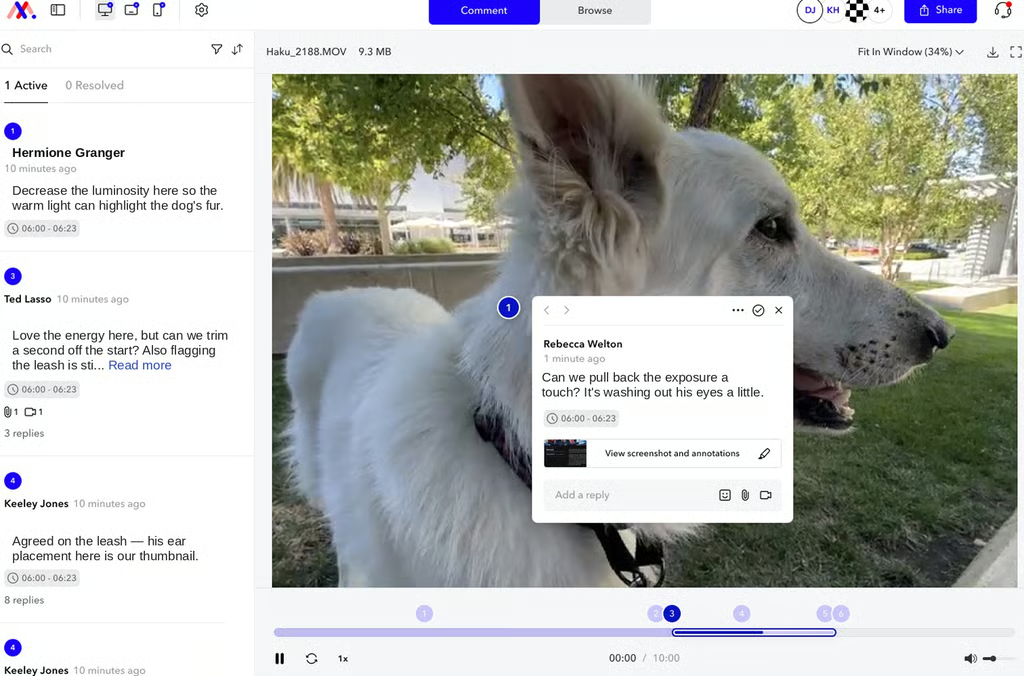
Feedbucket handles staging and live websites only. No PDF, image, design-file, or video review appears anywhere on their site. MarkUp reviews 30+ file types, including websites, images, PDFs, and video with timestamped comments, natively, on every plan.
Your price isn’t set by your headcount
Feedbucket’s Pro plan includes 2 team members. The next tier up, Business, includes 25, with no plan in between and no published rate for adding a member beyond Pro’s two. MarkUp includes unlimited team members on every plan.
Start with a link, not a deploy
Getting a site into Feedbucket means installing a JavaScript snippet or a WordPress plugin before a client can leave feedback. MarkUp just needs a URL, which helps when you’re reviewing a client’s site, a vendor’s staging build, or anything else you don’t control the code for.
02 · Feature comparison
How we stack up
A category-by-category look at how MarkUp and Feedbucket compare.
Capability
MarkUp
Feedbucket
Supported content
MarkUp
Websites, images, PDFs, and video with timestamped comments.
Feedbucket
Websites only. No PDF, image, design-file, or video review.
Getting a page into review
MarkUp
Paste a URL.
Feedbucket
Install a JavaScript snippet or WordPress plugin.
External reviewer access
MarkUp
Unlimited, free, no account required.
Feedbucket
Unlimited client reporters, no account required.
Internal team seats
MarkUp
Unlimited, every plan.
Feedbucket
2 (Pro, $39–49/mo), 25 (Business, $72–89/mo), custom (Enterprise).
Automatic technical capture
MarkUp
Browser, OS, and screen size, on every comment.
Feedbucket
Browser, OS, screen resolution, device info, console logs, and screen recording.
PM and dev-tool integrations
MarkUp
None natively. A public API and webhooks are available.
Feedbucket
16+ named integrations, including Asana, Jira, ClickUp, Trello, Linear, Slack, and GitHub.
Extensibility for developers and partners
MarkUp
Full API to create and retrieve MarkUps, manage review state, and trigger webhooks.
Plus an embeddable SDK to run MarkUp’s review UI inside another product.
Feedbucket
JavaScript API to customize widget behavior, Business plan and above. No embeddable SDK or backend API for custom integrations found.
Free trial
MarkUp
14 days.
Feedbucket
14 days, no credit card.
Free plan
MarkUp
None.
Feedbucket
None.
Starting price
MarkUp
$79/mo, unlimited users, no annual option.
Feedbucket
$39/mo annual or $49/mo monthly, 2 users.
03 · Why switch
Why switch from Feedbucket to MarkUp?
The price advantage only holds at exactly two people
Feedbucket’s annual rate makes a 2-person team cheaper than MarkUp ($39 vs. $79/mo), but MarkUp doesn’t offer annual pricing to compare against. It’s a single $79/mo rate.
2 people: Feedbucket $39/mo annual, MarkUp $79/mo
3 people, month to month: Feedbucket $89/mo, MarkUp $79/mo
Past 25 people: Feedbucket needs a custom Enterprise plan, MarkUp $79/mo
On equal terms, month to month, a 3-person team already costs more on Feedbucket ($89/mo) than MarkUp ($79/mo, still unlimited). Feedbucket only stays cheaper past two people if you commit to annual billing. Without that commitment, the crossover happens right at three, and the gap only widens after it. MarkUp’s $79/mo rate doesn’t change again, whether the team is 5 people or 50.
One tool covers the site and everything else around it
An agency using Feedbucket for staging-site feedback still needs a separate tool the moment a client wants comments on a deck, a PDF, or a video cut. MarkUp handles the site and that other work in the same place.
Worth knowing
Feedbucket connects directly to 16+ trackers, including Asana, Jira, and ClickUp. MarkUp doesn’t natively today, so feedback won’t land straight in one of those tools.
Monthly cost at 3 people
Feedbucket Business, billed monthly
MarkUp, any headcount
At two people on annual billing, Feedbucket is cheaper at $39/mo. MarkUp is $79 either way.
04 · Customer proof
Real teams, real feedback
“Communicating with a customer about a site has never been as easy as it is with MarkUp. This is the new standard.”
Andrew Belousoff
Toptal
“Just being able to upload a link and bounce comments back and forth is fantastic. It’s super intuitive.”
Ezekiel Rudick
Rosetta Stone
“We’ve implemented MarkUp into our creative workflow and getting feedback on our work has never been easier. Even clients who are less tech savvy have easily adopted to MarkUp!”
Kyle Hudson
Concept Theory
05 · FAQ
Commonly asked questions about MarkUp vs. Feedbucket
The bottom line
Past two people, or past websites, MarkUp holds up.
Feedbucket is genuinely the better fit for a solo operator or two-person team doing website-only client feedback that already runs its work through Asana, Jira, ClickUp, or a similar tool and wants that feedback routed straight in. MarkUp doesn’t connect natively to those tools today, and that’s a real gap worth saying plainly rather than working around. Once a team needs to review more than websites, or grows past two people, MarkUp holds up on both format range and price.