Marker.io alternative: Built for every reviewer, not just developers
Marker.io was built for developers triaging bugs. MarkUp was built for everyone reviewing everything else.
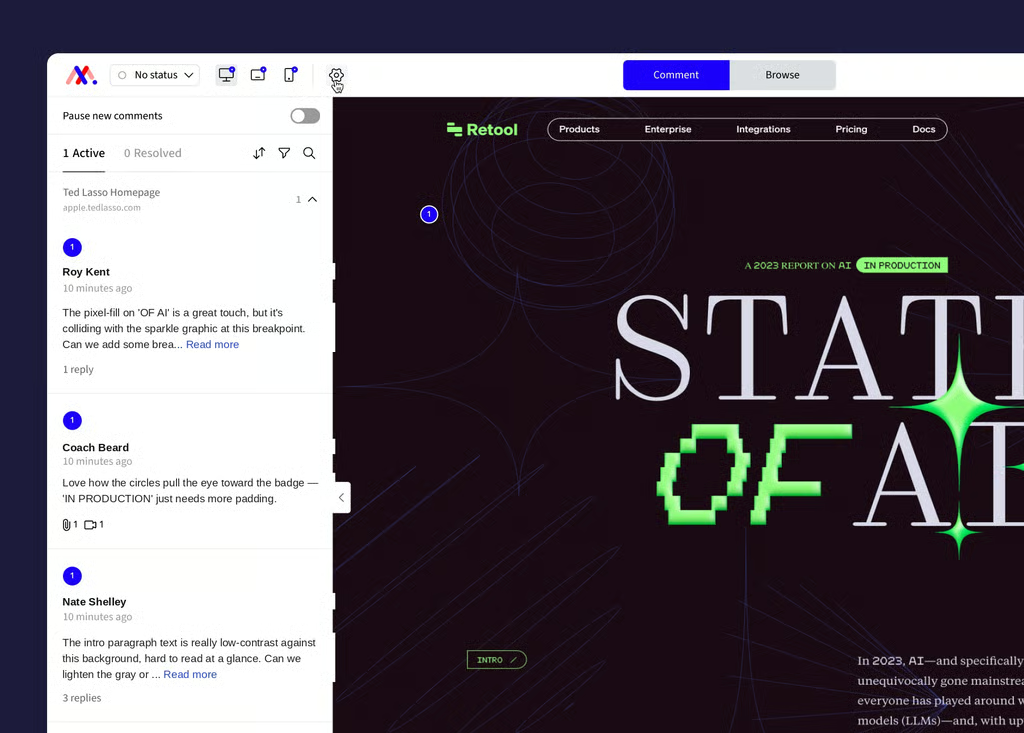
01 · Why MarkUp
Three things MarkUp does that Marker.io doesn’t
Review more than web pages
Marker.io reviews live websites and web apps, full stop. Everything else is an attachment, up to 50MB, that nobody can annotate. MarkUp reviews websites, images, PDFs, and video with timestamped comments, natively, on every plan.
Bring in everyone, for free
On Marker.io, a guest is a paid seat: 10 on Starter, 50 on Team. Reporters are free and unlimited, but they’re locked out of the dashboard entirely. Every MarkUp plan includes unlimited users and unlimited guests, no account required.
Start reviewing with a link, not a deploy
Getting a site into Marker.io means adding a widget snippet, installing a browser extension, or setting up a WordPress plugin before anyone can leave a comment. MarkUp just needs a URL, which helps when you’re reviewing a client’s site, a vendor’s staging build, or anything else you don’t control the code for.
02 · Feature comparison
How we stack up
A row-by-row look at where the two tools differ. Marker.io figures are for its Team plan unless noted.
Capability
MarkUp
Marker.io
Native review formats
MarkUp
Websites, images, PDFs, and video with timestamped comments.
Marker.io
Live websites and web apps only. Other files can be attached, not reviewed.
Getting a page into review
MarkUp
Paste a URL.
Marker.io
Install a widget snippet, browser extension, or WordPress plugin.
Internal team members
MarkUp
Unlimited on every plan.
Marker.io
Capped: 3 on Starter, 15 on Team, plus $4–$6/mo per extra seat on annual billing.
External reviewers
MarkUp
Unlimited, free, no account required.
Marker.io
Guests are a paid seat: 10 on Starter, 50 on Team.
Free plan
MarkUp
None. A 14-day trial instead, credit card required.
Marker.io
None. A 15-day trial instead, no credit card required.
Entry pricing
MarkUp
$79/mo, no annual option.
Marker.io
Team: $149/mo annual ($199 billed monthly), the plan shown throughout this table. Marker.io’s cheapest plan, Starter, starts at $39/mo annual and undercuts MarkUp on price, but it doesn’t include issue sync, session replay, or developer tools.
Issue tracker integrations
MarkUp
No native integration. MarkUp’s Zapier integration can be used to set up workflows into Jira, Asana, Linear, and similar tools.
Marker.io
Creates issues in 15 tools including Jira, Asana, and Linear. Status updates sync back from those tools into Marker.io, but a change made inside Marker.io only posts as a comment in the connected tool, not a full two-way sync, per Marker.io’s own help documentation.
Technical capture
MarkUp
Basic capture. Every comment captures the reviewer’s browser, OS, and screen size.
Marker.io
Console logs, network requests, and session replay, included on Team and above.
Approval and sign-off
MarkUp
A per-person sign-off record for each reviewer.
Marker.io
A single “Waiting for Approval” status per issue, with no per-person record.
03 · Why switch
Why switch from Marker.io to MarkUp?
The guest math changes as you grow
A brand running a 40-person review, or an agency juggling 12 active clients, costs nothing more on MarkUp.
Marker.io Starter: 10 guest seats
Marker.io Team: 50 guest seats
MarkUp, every plan: unlimited guests, no account required
On Marker.io, that same team needs to move to a custom Business plan once it passes 50 guests, an application-gated process, not something you can add with a card.
Know who actually signed off
When a launch review needs a client’s legal team, brand, and three regional stakeholders to each confirm they’ve seen the final version, MarkUp shows a per-person signed-off or pending status for every reviewer. It’s clear at a glance who’s still outstanding.
Worth knowing
Marker.io tracks a single “Waiting for Approval” status per issue. It tells you the issue was approved, not who approved it or whether everyone actually looked.
Guest reviewers included
Marker.io Team, paid guest seats
MarkUp, every plan
Past 50 guests, Marker.io moves you to a custom Business plan, by application.
04 · What teams say
What review teams tell us
“Communicating with a customer about a site has never been as easy as it is with MarkUp. This is the new standard.”
Andrew Belousoff
Toptal
“Just being able to upload a link and bounce comments back and forth is fantastic. It’s super intuitive.”
Ezekiel Rudick
Rosetta Stone
“The engagement across all of our teams and the willingness to provide feedback has increased because MarkUp is such an easy place to centralize everything.”
Nina Barone
Getty Images
05 · FAQ
Commonly asked questions about MarkUp vs. Marker.io
The bottom line
If your review is bigger than a bug queue, MarkUp is built for it.
Marker.io is the stronger choice if your feedback needs to become a ticket in Jira, Linear, or Asana with console logs and a session replay attached. That’s the job it’s built for, and it does it better than MarkUp does today. If your review process spans more than web pages, involves reviewers outside your company who shouldn’t need a paid seat, or needs to start with just a link, MarkUp is built for that instead.